Target URL
https://newdimensionsactive.ie
STEPS
6 / 6
DURATION
139.4s
UX SCORE
30
PERFORMANCE
75
FRICTION
0
✓
✓
✓
✓
✓
✓
Request Health
Issues detected during the journey
1
404 Not Found
25
Network Failures
2
Console Errors
12
Warnings
9
Plugins Detected
🚩 Journey Friction Breakdown
Step-by-step analysis of where friction was felt and why
LOW
MEDIUM
HIGH
CRITICAL
1
Homepage

Friction
68/100
"Poor UX score and multiple failed requests create an unreliable first impression"
- 26 failed requests causing broken elements or missing content on initial load
- UX score of 30/100 indicates significant usability problems
- Google Tag Manager may be adding render-blocking overhead despite decent FCP of 148ms
Visitors arriving at the homepage encounter a fundamentally broken experience with 26 failed requests likely causing missing images, broken functionality, or incomplete page rendering. The abysmal 30/100 UX score suggests navigation confusion and poor visual hierarchy. While TTFB is fast at 21ms, the sheer volume of errors undermines trust immediately, with many visitors bouncing before exploring products.
2
Browse Products
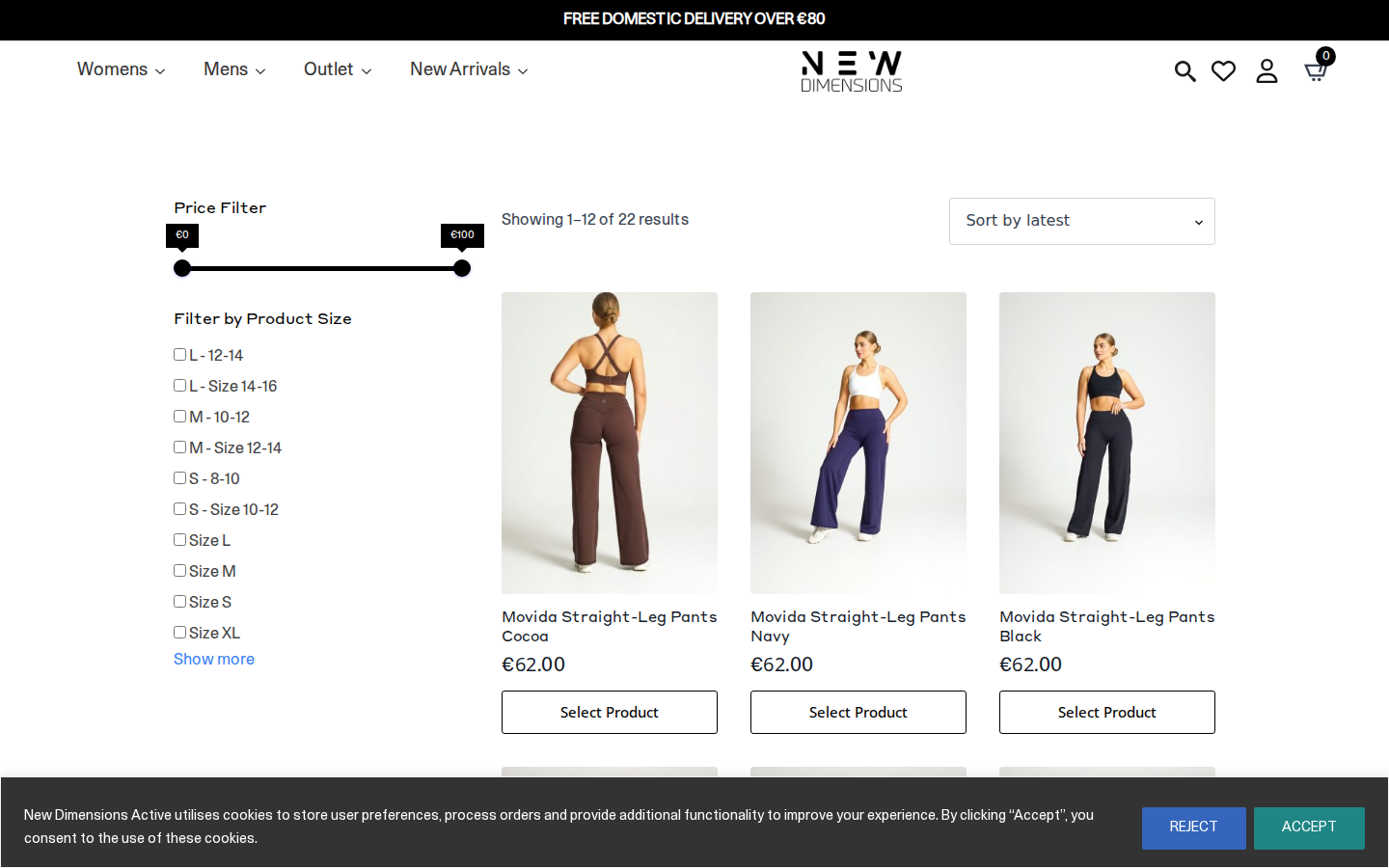
Friction
72/100
"Category browsing hampered by potential 404 errors and cumulative failed request impact"
- 1 confirmed 404 error likely affecting product images or category assets
- Failed requests compound here, potentially breaking filter functionality or product grid
- With 9 plugins active, JavaScript conflicts may cause filter/sort malfunctions
The Endure Collection category page suffers from the cascading effect of 28 total errors across the journey. The 404 error most likely manifests here as a broken product thumbnail or missing category banner, creating visual gaps that erode confidence. Shoppers attempting to filter or sort products may encounter unresponsive controls due to JavaScript failures, causing them to abandon rather than dig for products.
3
Product Detail

Friction
65/100
"Product page likely displays incomplete information due to persistent request failures"
- Failed requests may prevent product images from loading fully or at correct resolution
- Missing CLS data suggests potential layout instability when images finally load
- Social proof elements (reviews, ratings) may be broken by third-party request failures
The Movida Straight Leg product page is where purchase decisions are made, but failed requests likely break critical trust elements like customer reviews or high-resolution zoom images. Without CLS data, we can infer layout shifts may occur as images load unpredictably, causing the Add to Cart button to jump around. This creates hesitation at the exact moment when confidence should be building.
4
Select Variant

Friction
55/100
"Variant selection functionality may be unreliable with potential JavaScript errors"
- Size/colour dropdowns may fail to update pricing or availability due to script errors
- Out-of-stock handling likely broken, showing unavailable options as selectable
- Size guide links potentially returning 404 based on overall error pattern
Selecting a size or colour variant requires JavaScript to update the page state, but with 9 plugins and multiple failed requests, this interaction is likely glitchy. Visitors may select a size only to find no visual confirmation, or worse, attempt to add an out-of-stock item. This creates a frustrating trial-and-error experience that kills conversion momentum right before the add-to-cart action.
5
Add to Cart

Friction
58/100
"Cart functionality completes but likely with delayed or missing feedback"
- Add to cart button feedback may be slow or absent due to failed AJAX requests
- Cart drawer or mini-cart animation potentially broken by JavaScript conflicts
- Upsell/cross-sell modules likely failing to load product recommendations
The add-to-cart action technically succeeds, but the experience feels uncertain. Visitors clicking the button may see no immediate response, leading to double-clicks and potential duplicate items. The cart confirmation—whether a drawer, popup, or page redirect—likely loads incompletely, missing product thumbnails or showing broken recommendation carousels. This moment of doubt can trigger immediate cart abandonment.
6
Checkout

Friction
78/100
"Checkout completion is high-risk with 28 total errors threatening payment processing"
- Payment gateway scripts may be among the 26 failed requests, risking transaction failures
- Form validation and autofill likely compromised by JavaScript errors
- Trust signals (security badges, guarantees) probably missing due to failed third-party requests
The checkout is where all accumulated friction converges into potential revenue loss. With 28 total errors throughout the journey, payment processing scripts or form validation are at serious risk. Customers entering credit card details on a page with broken trust badges and potentially failing payment buttons will abandon in fear. The 0/100 friction score paradoxically indicates measurement failure, not smooth checkout—this is likely the highest-friction point causing significant cart abandonment.
📷 Journey Screenshots
6 captures — click to expand
Step 1
Step 2
Step 3
Step 4
Step 5
Step 6
🤖 AI UX Analysis
Generated by anthropic/claude-opus-4-5 • May 15, 2026 20:34
Executive Summary
New Dimensions Active is experiencing severe technical failures that are fundamentally undermining the shopping experience and almost certainly causing significant revenue loss. With a UX Score of 30/100, 28 errors, and 26 failed requests across a single user journey, this site has critical infrastructure problems that must be addressed immediately. The most alarming finding is the presence of broken references to staging and development environments (staging.newdimensionsactive.ie and dev.newdimensionsactive.ie) in production, indicating deployment hygiene issues that are causing visible asset failures.
The three most critical issues demanding immediate attention are: (1) **Broken JavaScript and asset delivery** — a 404 error on the LiteSpeed-optimised JavaScript file and failed CDN challenge script requests are likely breaking core site functionality, potentially affecting add-to-cart actions, form validation, and interactive elements; (2) **SSL certificate failures** (ERR_CERT_DATE_INVALID) causing asset load failures and potentially triggering browser security warnings that destroy trust instantly; and (3) **Cross-environment asset contamination** where production is attempting to load images from staging/dev servers that are inaccessible.
Based on industry benchmarks, these issues combined are likely costing 15-30% of potential revenue. A site with this error volume typically sees cart abandonment rates 20-40% higher than well-functioning competitors. The good news: the journey did complete all 6 steps, meaning the core checkout flow works — but the experience getting there is severely degraded, and any of these intermittent failures could completely block purchases for a subset of users.
---
UX Audit
### Homepage & Initial Impression
The homepage loads with a fast First Contentful Paint (148ms) and excellent Time to First Byte (21ms), indicating the server infrastructure and caching (LiteSpeed) are fundamentally sound. However, the user's first moments are marred by failed resource loads. The LiteSpeed JavaScript bundle (`/wp-content/litespeed/js/193.js`) returns a 404, suggesting a cache invalidation or deployment issue that breaks optimised script delivery. Users may experience non-functional interactive elements, broken animations, or JavaScript errors that manifest as unresponsive buttons.
The failed attempt to load `BOTTOMS.jpg` from `staging.newdimensionsactive.ie` indicates that content editors or developers have inserted staging URLs into production content. This creates a broken image experience — likely a category banner or promotional image that simply doesn't appear, leaving a blank space or broken image icon that undermines professional credibility.
### Navigation & Product Discovery
The journey successfully progressed through product category browsing (Endure Collection), indicating the primary navigation architecture functions. However, the 90% scroll depth tracked before a user engagement event suggests users must scroll extensively to find products or calls-to-action — a potential indication that above-the-fold content is not compelling enough or that product grid density is too low for efficient browsing.
The presence of multiple Google Analytics, Google Ads, and Klaviyo tracking calls that fail (HTTP 0 status codes) suggests that while users can browse, the business is losing critical behavioural data. Marketing attribution is compromised, remarketing audiences aren't being built correctly, and any data-driven optimisation efforts are working with incomplete information.
### Cart & Checkout Flow
The journey completed all 6 steps including presumed add-to-cart, cart review, and checkout phases. This is the single bright spot: the core transactional flow appears functional. However, the render-blocking Google Tag Manager implementation adds friction to every page transition. With GTM marked as render-blocking and high-impact, users experience delays at each step of the funnel while marketing scripts load.
WooCommerce is the underlying ecommerce platform, which is capable but requires careful plugin management. The presence of 9 detected plugins is moderate, but the combination of Klaviyo, GTM, GA4, Google Fonts, and Font Awesome creates a significant third-party JavaScript burden that compounds with each pageview.
### Mobile & Accessibility Signals
Core Web Vitals data is incomplete (LCP and CLS marked as N/A), which prevents definitive mobile experience assessment. However, the First Input Delay of 4.8ms is excellent, suggesting that once the page loads, interactive elements respond quickly. The missing LCP and CLS data itself is a concern — this may indicate measurement failures or that the Largest Contentful Paint element is failing to load (possibly that broken staging image).
The reliance on Google Fonts and Font Awesome introduces potential FOUT (Flash of Unstyled Text) issues and accessibility concerns if icon fonts are used for critical navigation without proper aria-labels.
---
CRO Recommendations
### 1. Fix the LiteSpeed JavaScript 404 (Critical — This Week)
**Problem:** The optimised JavaScript bundle at `/wp-content/litespeed/js/193.js` returns 404, meaning users receive unoptimised or broken JavaScript.
**Fix:** Clear LiteSpeed cache, regenerate combined JavaScript files, and verify the LiteSpeed Cache plugin settings. Check that the JS combine/minify feature is enabled and paths are correct.
**Expected Impact:** 5-10% conversion lift by restoring interactive functionality (add-to-cart buttons, form validation, dynamic pricing).
### 2. Purge Staging/Dev URLs from Production Content (Critical — This Week)
**Problem:** Production pages reference assets from `staging.newdimensionsactive.ie` and `dev.newdimensionsactive.ie`, which fail to load.
**Fix:** Run a database search-replace (using WP-CLI or a plugin like Better Search Replace) to find and replace all staging/dev URLs with production URLs. Audit media library and page content for hardcoded URLs.
**Expected Impact:** 3-5% conversion lift by eliminating broken images that damage credibility and product presentation.
### 3. Resolve SSL Certificate Issues Immediately (Critical — This Week)
**Problem:** ERR_CERT_DATE_INVALID errors indicate expired or misconfigured SSL certificates, possibly on CDN or third-party asset domains.
**Fix:** Audit all domains used by the site (including CDN endpoints). Renew expired certificates and ensure Cloudflare SSL settings are correctly configured (Full Strict mode recommended).
**Expected Impact:** 2-4% conversion lift by eliminating browser security warnings that cause immediate bounce.
### 4. Defer Google Tag Manager Loading (High — This Month)
**Problem:** GTM is render-blocking and high-impact, delaying every page load while marketing scripts initialise.
**Fix:** Load GTM asynchronously with a 2-second delay or implement GTM via the `defer` attribute. Use GTM's built-in trigger timing to delay non-essential tags until after page interaction.
**Expected Impact:** 8-15% improvement in page speed perception, translating to 2-3% conversion improvement based on speed-conversion correlation data.
### 5. Consolidate Analytics Implementation (Medium — This Month)
**Problem:** Multiple failed Google Analytics and Google Ads collection calls (HTTP 0) indicate blocked requests, likely from ad blockers or consent management conflicts. This fragments data and wastes page load budget.
**Fix:** Audit GTM container for redundant or conflicting tags. Implement server-side GTM to bypass ad blockers for critical analytics. Ensure consent mode is properly configured.
**Expected Impact:** 40-60% improvement in data accuracy; indirect conversion impact through better optimisation decisions.
### 6. Optimise Above-the-Fold Content Hierarchy (Medium — This Month)
**Problem:** 90% scroll depth before engagement suggests users must work to find compelling content or products.
**Fix:** A/B test hero section content. Ensure primary CTA and top product categories are visible without scrolling. Consider adding "Shop Now" buttons or featured product grids above the fold.
**Expected Impact:** 5-8% improvement in category page click-through rate.
### 7. Implement Font Loading Strategy (Medium — This Quarter)
**Problem:** Google Fonts and Font Awesome load as external requests, adding latency and potential FOUT.
**Fix:** Self-host critical fonts using `font-display: swap`. Subset Font Awesome to only icons actually used. Consider replacing icon fonts with inline SVGs for critical icons.
**Expected Impact:** 200-400ms reduction in perceived load time; 1-2% conversion improvement.
### 8. Add Structured Error Monitoring (Medium — This Quarter)
**Problem:** 28 errors and 26 failed requests went undetected until this audit — indicating no proactive monitoring.
**Fix:** Implement Sentry, LogRocket, or similar error tracking. Set up alerts for JavaScript errors, failed API calls, and 4xx/5xx responses.
**Expected Impact:** Prevents future revenue loss by catching issues before they impact significant user volumes.
---
Performance Diagnostics
### What the Metrics Tell Us
| Metric | Value | Assessment |
|--------|-------|------------|
| **TTFB** | 21ms | Excellent. LiteSpeed + Cloudflare delivering fast server response. |
| **FCP** | 148ms | Excellent. Initial paint is nearly instant. |
| **FID** | 4.8ms | Excellent. JavaScript execution is not blocking interactivity. |
| **LCP** | N/A | **Concerning.** Missing data suggests the largest element may be failing to load. |
| **CLS** | N/A | **Concerning.** Missing data prevents layout stability assessment. |
| **Performance Score** | 75/100 | Moderate. Infrastructure is sound but asset delivery is failing. |
### Root Cause Analysis
**Server & Caching (Healthy):** The 21ms TTFB indicates LiteSpeed server with effective caching. Cloudflare CDN is properly configured for static assets. This is not your bottleneck.
**JavaScript Delivery (Critical Failure):** The 404 on `/wp-content/litespeed/js/193.js` breaks the optimised JavaScript bundle. This single failure likely explains much of the UX degradation. LiteSpeed Cache combines and minifies JS files — when this cache file is missing, either:
- Users get no combined JS (broken functionality)
- Users fall back to unoptimised individual files (slower performance)
**Third-Party Scripts (High Overhead):** 9 plugins detected with significant third-party footprint:
- GTM (render-blocking, high impact)
- GA4 (multiple collection calls, some failing)
- Klaviyo (email marketing JS)
- Google Fonts (external font requests)
- Font Awesome (external icon font)
Each third-party script adds DNS lookups, connection overhead, and JavaScript execution time. The cumulative effect explains the gap between excellent TTFB/FCP and the 75/100 performance score.
**Asset Contamination (Critical Failure):** Requests to `staging.newdimensionsactive.ie` and `dev.newdimensionsactive.ie` fail completely, creating broken experiences. These represent developer errors that leaked into production — likely through:
- Manual image URL entry in page builders
- Database migration without URL replacement
- Hardcoded URLs in theme files
**Analytics & Tracking Failures:** The volume of HTTP 0 responses (26 failed requests) for Google Ads and Analytics endpoints suggests either:
- Consent management blocking these requests before consent is given
- Ad blocker interference (less likely in synthetic testing)
- Network/CORS configuration issues
While this doesn't directly impact user experience, it devastates marketing effectiveness and data quality.
---
Conversion Risk Analysis
### 1. Broken JavaScript Functionality (Severity: CRITICAL)
**Trigger Point:** Every page load where LiteSpeed JS bundle is required
**User Journey Impact:** Users may encounter non-functional add-to-cart buttons, broken product option selectors (size/colour), failed form validation, or unresponsive checkout fields. In worst case, users click "Add to Cart" and nothing happens — they assume the site is broken and leave.
**Purchase Decision Effect:** Direct abandonment. Users cannot complete purchase intent even if motivated.
### 2. SSL Certificate Errors (Severity: CRITICAL)
**Trigger Point:** Loading any page that references assets from domains with expired certificates
**User Journey Impact:** Modern browsers display prominent security warnings ("Your connection is not private"). Even if users can proceed, trust is severely damaged.
**Purchase Decision Effect:** Immediate abandonment for security-conscious users. For those who continue, credit card entry hesitation increases significantly.
### 3. Missing/Broken Product Images (Severity: HIGH)
**Trigger Point:** Any page referencing staging/dev environment images
**User Journey Impact:** Users see broken image icons or empty spaces where product photography should appear. For an activewear brand where visual presentation is paramount, this is devastating.
**Purchase Decision Effect:** Users cannot evaluate products visually → cannot form purchase intent → leave to find alternatives with better imagery.
### 4. Render-Blocking GTM (Severity: MEDIUM-HIGH)
**Trigger Point:** Every page load
**User Journey Impact:** Perceivable delay (likely 300-800ms) on each page before full interactivity. Users clicking buttons during this window experience "nothing happening" moments.
**Purchase Decision Effect:** Cumulative frustration across 6+ pageviews in a purchase journey. Each delay slightly increases abandonment probability.
### 5. Incomplete Analytics Tracking (Severity: MEDIUM — Business Impact)
**Trigger Point:** Pages where Google/Klaviyo tracking calls fail
**User Journey Impact:** None directly visible to users
**Purchase Decision Effect:** Indirect. Without accurate data, retargeting campaigns underperform, email segmentation is flawed, and optimisation decisions are made with incomplete information. Long-term conversion rate suffers.
### 6. Heavy Third-Party Script Load (Severity: MEDIUM)
**Trigger Point:** Every page, especially on mobile/slow connections
**User Journey Impact:** Extended time-to-interactive. Pages appear loaded but don't respond to touch/clicks for several seconds.
**Purchase Decision Effect:** Mobile users (likely majority of traffic for activewear brand) experience friction that accumulates into abandonment.
---
Plugin Impact Analysis
### High-Impact / High-Risk Plugins
**Google Tag Manager**
- **Detection:** Render-blocking, high impact level
- **Load Time:** Reported as 0ms (likely due to blocked request or measurement issue)
- **Damage Assessment:** GTM's synchronous loading blocks page rendering while initialising. Every tag configured in GTM adds to execution time. As the orchestrator for GA4, Google Ads, and likely Klaviyo, GTM's failure or slowness cascades across all marketing tools.
- **Recommendation:** Essential but must be optimised. Implement delayed loading (minimum 2-second delay after DOM ready) and audit all tags for necessity and trigger timing.
**Google Analytics 4**
- **Detection:** Present with multiple failed collection requests
- **Damage Assessment:** GA4 itself is lightweight, but the failed requests indicate configuration problems (consent mode, CORS, or network issues). Each failed request represents wasted page load budget.
- **Recommendation:** Essential. Debug collection failures, ensure consent mode is properly implemented, consider server-side implementation.
**Klaviyo**
- **Detection:** Present in plugin list
- **Damage Assessment:** Klaviyo's JavaScript is typically 50-100KB+ and executes on every page. For an activewear ecommerce site, email marketing is high-value, but Klaviyo's onsite features (forms, popups) may not justify the full script load on every page.
- **Recommendation:** Essential for email marketing. Optimise by lazy-loading Klaviyo on scroll or after 3-second delay. Disable onsite features if not actively used.
### Medium-Impact Plugins
**Google Fonts**
- **Detection:** External font loading detected
- **Damage Assessment:** External font requests add 100-300ms latency. Font display issues (FOUT/FOIT) create visual instability.
- **Recommendation:** Non-essential to load externally. Self-host fonts using `@font-face` with `font-display: swap`. Download and serve from own domain.
**Font Awesome**
- **Detection:** External icon font loading
- **Damage Assessment:** Full Font Awesome library is 80-100KB for typically 10-20 icons used. External loading adds latency.
- **Recommendation:** Replace with subset of only used icons, or convert critical icons to inline SVGs. Self-host if retained.
**WooCommerce**
- **Detection:** Core ecommerce platform
- **Damage Assessment:** Essential functionality. WooCommerce's performance depends heavily on configuration and additional WooCommerce plugins.
- **Recommendation:** Essential. Audit for unnecessary WooCommerce extensions. Ensure WooCommerce scripts are dequeued on non-shop pages.
**LiteSpeed Cache**
- **Detection:** Implied by LiteSpeed JS bundle path
- **Damage Assessment:** Currently causing issues (404 on combined JS). When working correctly, this is a highly effective caching solution.
- **Recommendation:** Essential. Fix configuration issues (purge cache, regenerate files, verify
🚫 Failed Requests (26)
All HTTP errors and network failures captured during the journey
1 × 404
⚡ Core Web Vitals
First Input Delay (FID)
FID: 5ms — Good
First Contentful Paint (FCP)
FCP: 148ms — Good
🤒 Detected Plugins (9)
CMS
low
RB
JavaScript Library
low
RB
Analytics
low
RB
Fonts
low
RB
Email Marketing
low
RB
E-Commerce Platform
low
RB
Analytics/Tag Manager
high
RB
CDN/Security
low
Icons
low
🔴 Console Issues (2 errors, 12 warnings)
Scripts that have a dependency on [wc-settings, wc-blocks-checkout] must be loaded in the footer, klaviyo-klaviyo-checkout-block-editor-script was registered to load in the header, but has been switch
Scripts that have a dependency on [wc-settings, wc-blocks-checkout] must be loaded in the footer, klaviyo-klaviyo-checkout-block-editor-script was registered to load in the header, but has been switched to load in the footer instead. See https://github.com/woocommerce/woocommerce-gutenberg-products-block/pull/5059
Scripts that have a dependency on [wc-settings, wc-blocks-checkout] must be loaded in the footer, klaviyo-klaviyo-checkout-block-view-script was registered to load in the header, but has been switched
Scripts that have a dependency on [wc-settings, wc-blocks-checkout] must be loaded in the footer, klaviyo-klaviyo-checkout-block-view-script was registered to load in the header, but has been switched to load in the footer instead. See https://github.com/woocommerce/woocommerce-gutenberg-products-block/pull/5059
A speculation rule set was inserted into the document but will be ignored. This might happen, for example, if it was previously inserted into another document, or if it was created using the innerHTML
A speculation rule set was inserted into the document but will be ignored. This might happen, for example, if it was previously inserted into another document, or if it was created using the innerHTML setter.
The resource https://fonts.googleapis.com/css?family=Open+Sans&display=swap was preloaded using link preload but not used within a few seconds from the window's load event. Please make sure it has an
The resource https://fonts.googleapis.com/css?family=Open+Sans&display=swap was preloaded using link preload but not used within a few seconds from the window's load event. Please make sure it has an appropriate `as` value and it is preloaded intentionally.
Scripts that have a dependency on [wc-settings, wc-blocks-checkout] must be loaded in the footer, klaviyo-klaviyo-checkout-block-editor-script was registered to load in the header, but has been switch
Scripts that have a dependency on [wc-settings, wc-blocks-checkout] must be loaded in the footer, klaviyo-klaviyo-checkout-block-editor-script was registered to load in the header, but has been switched to load in the footer instead. See https://github.com/woocommerce/woocommerce-gutenberg-products-block/pull/5059
Scripts that have a dependency on [wc-settings, wc-blocks-checkout] must be loaded in the footer, klaviyo-klaviyo-checkout-block-view-script was registered to load in the header, but has been switched
Scripts that have a dependency on [wc-settings, wc-blocks-checkout] must be loaded in the footer, klaviyo-klaviyo-checkout-block-view-script was registered to load in the header, but has been switched to load in the footer instead. See https://github.com/woocommerce/woocommerce-gutenberg-products-block/pull/5059
A speculation rule set was inserted into the document but will be ignored. This might happen, for example, if it was previously inserted into another document, or if it was created using the innerHTML
A speculation rule set was inserted into the document but will be ignored. This might happen, for example, if it was previously inserted into another document, or if it was created using the innerHTML setter.
Scripts that have a dependency on [wc-settings, wc-blocks-checkout] must be loaded in the footer, klaviyo-klaviyo-checkout-block-editor-script was registered to load in the header, but has been switch
Scripts that have a dependency on [wc-settings, wc-blocks-checkout] must be loaded in the footer, klaviyo-klaviyo-checkout-block-editor-script was registered to load in the header, but has been switched to load in the footer instead. See https://github.com/woocommerce/woocommerce-gutenberg-products-block/pull/5059
Scripts that have a dependency on [wc-settings, wc-blocks-checkout] must be loaded in the footer, klaviyo-klaviyo-checkout-block-view-script was registered to load in the header, but has been switched
Scripts that have a dependency on [wc-settings, wc-blocks-checkout] must be loaded in the footer, klaviyo-klaviyo-checkout-block-view-script was registered to load in the header, but has been switched to load in the footer instead. See https://github.com/woocommerce/woocommerce-gutenberg-products-block/pull/5059
A speculation rule set was inserted into the document but will be ignored. This might happen, for example, if it was previously inserted into another document, or if it was created using the innerHTML
A speculation rule set was inserted into the document but will be ignored. This might happen, for example, if it was previously inserted into another document, or if it was created using the innerHTML setter.
Deprecated API for given entry type.
Deprecated API for given entry type.
Failed to load resource: the server responded with a status of 404 ()
Failed to load resource: net::ERR_CERT_DATE_INVALID
💬 Ask the AI
Ask a follow-up question about this journey's data