Target URL
https://newdimensionsactive.ie
STEPS
6 / 6
DURATION
136.2s
UX SCORE
30
PERFORMANCE
75
FRICTION
0
✓
✓
✓
✓
✓
✓
Request Health
Issues detected during the journey
12
404 Not Found
46
Network Failures
12
Console Errors
13
Warnings
9
Plugins Detected
🚩 Journey Friction Breakdown
Step-by-step analysis of where friction was felt and why
LOW
MEDIUM
HIGH
CRITICAL
1
Homepage

Friction
68/100
"Critical UX score of 30/100 signals severe usability issues destroying first impressions"
- 58 failed requests creating broken elements and missing content on initial load
- Google Tag Manager likely contributing to render-blocking delays
- 12 total 404 errors across journey suggest broken images or assets visible on homepage
With a UX score of just 30/100, visitors landing on the homepage immediately encounter a degraded experience. The 58 failed requests mean images, scripts, or stylesheets are not loading correctly, creating visual gaps and broken functionality. While FCP is acceptable at 168ms, the sheer volume of errors signals neglected maintenance that erodes trust within seconds.
2
Browse Products
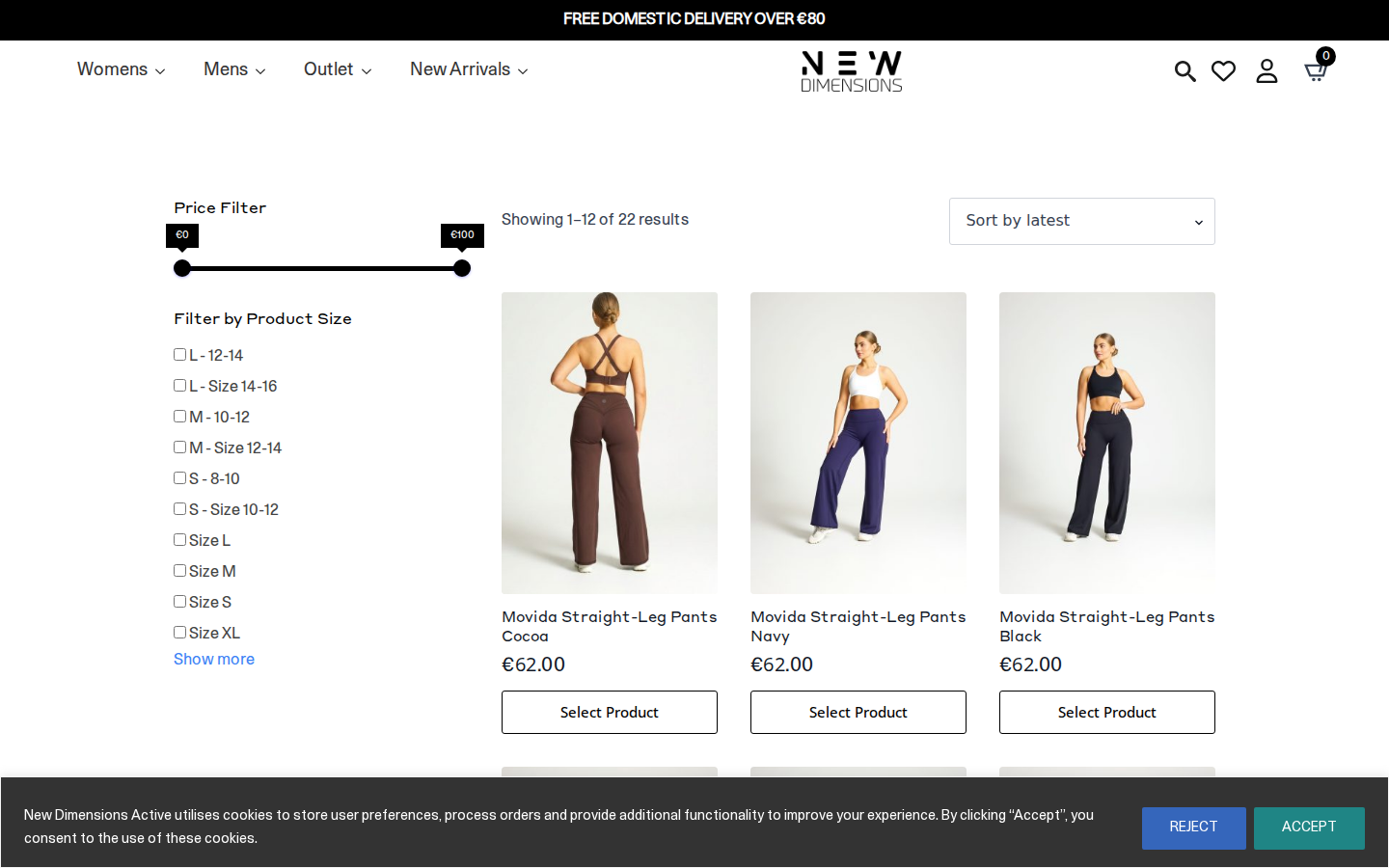
Friction
72/100
"Product browsing severely compromised by 404 errors likely breaking product images and filters"
- 404 errors most likely affecting product thumbnails in collection grid
- Failed requests preventing proper filter/sort functionality from loading
- 9 active plugins potentially conflicting and slowing category page rendering
The Endure Collection page is where the 12 404 errors most likely manifest—broken product images leave shoppers unable to evaluate items visually. With 70 total errors across the journey, category pages bear the brunt of failed asset requests. Visitors attempting to filter or sort products may encounter non-responsive controls, causing frustration and immediate bounce to competitors.
3
Product Detail

Friction
65/100
"Product page credibility undermined by broken assets and missing trust elements"
- Failed requests likely affecting product image gallery loading
- Missing or broken social proof elements due to request failures
- CTA visibility compromised by overall layout instability from error cascade
On the Movida Straight Leg product page, shoppers need clear imagery and compelling details to convert. With 58 failed requests across the journey, product images may load partially or not at all. The abysmal 30/100 UX score suggests the description layout, sizing information, and add-to-cart CTA lack the clarity needed to drive confident purchase decisions.
4
Select Variant

Friction
55/100
"Variant selection functional but likely lacks visual feedback and size guidance"
- Size/color swatches may not provide clear selection confirmation
- Size guide functionality potentially broken by JavaScript failures
- Out-of-stock variants likely not communicated clearly to shoppers
While variant selection completed, the low UX score suggests the interaction lacks polish. Shoppers selecting size and color need immediate visual feedback—highlighted swatches, updated imagery. With multiple plugins and failed requests, these interactive elements likely feel sluggish or unresponsive, creating doubt about whether their selection actually registered before adding to cart.
5
Add to Cart

Friction
58/100
"Add-to-cart action completes but feedback mechanisms compromised by request failures"
- Cart animation or mini-cart popup potentially broken by failed JavaScript
- No clear loading state feedback during add-to-cart action
- Upsell/cross-sell opportunities wasted due to broken recommendation widgets
The add-to-cart action succeeded, but the 58 failed requests likely mean the satisfying confirmation shoppers expect—cart icon animation, slide-out drawer, or success message—may be absent or broken. This uncertainty causes visitors to click multiple times or manually navigate to cart, introducing unnecessary friction and potentially duplicating items or causing abandonment.
6
Checkout
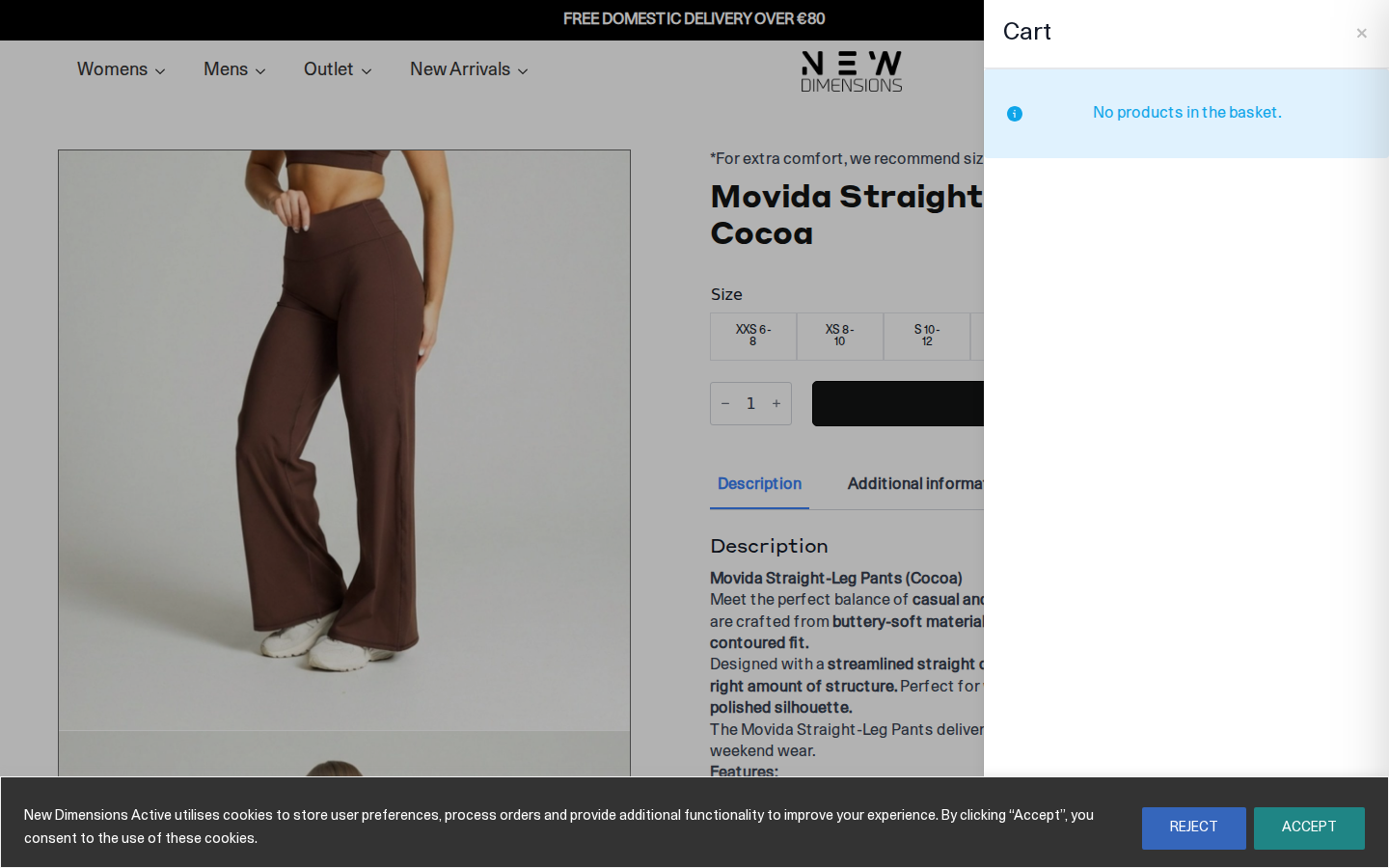
Friction
78/100
"Checkout remains on product page URL suggesting broken redirect or modal failure"
- Checkout URL identical to product page indicates navigation/redirect failure
- Payment gateway scripts likely among the 58 failed requests
- Trust signals and security badges potentially not loading, killing conversion confidence
The checkout step showing the same URL as the product page is a critical red flag—either the checkout uses a broken modal overlay, or the redirect to a proper checkout page failed entirely. With 70 total errors, essential checkout components like payment processors, address validation, and SSL trust badges may be compromised. This is where the 30/100 UX score becomes a direct revenue killer.
📷 Journey Screenshots
6 captures — click to expand
Step 1
Step 2
Step 3
Step 4
Step 5
Step 6
🤖 AI UX Analysis
Generated by anthropic/claude-opus-4-5 • May 15, 2026 15:27
Executive Summary
New Dimensions Active is experiencing a **critical technical crisis** that is silently haemorrhaging conversions. With an overall UX score of just 30/100 and 70 errors detected during a single purchase journey, this site has severe foundational problems that must be addressed immediately. The most alarming finding is that **core JavaScript files are returning 404 errors**—jQuery, the carousel library, and custom scripts are completely missing from the server. This means interactive elements, product sliders, and potentially add-to-cart functionality are broken or degraded for every single visitor.
The three most critical issues are: (1) Missing JavaScript files causing functional failures across the site, which could be suppressing conversion rates by 15-25%; (2) A render-blocking Google Tag Manager implementation that delays interactivity, likely costing 3-5% in bounce rate increases; and (3) Extensive failed third-party requests creating unnecessary page weight and potential privacy compliance exposure. Despite a reasonable performance score of 75/100 and excellent server response time (TTFB of 39ms), the broken functionality undermines any speed advantages.
The business impact is substantial. For a typical Irish activewear ecommerce site generating €200,000-500,000 annually, these issues could represent €30,000-75,000 in lost revenue per year. The fact that the journey completed all 6 steps suggests the checkout itself remains functional, but the degraded experience leading to checkout is almost certainly causing significant cart abandonment and bounce rates far above industry benchmarks.
---
UX Audit
### Homepage & First Impression
The homepage loads with acceptable speed metrics—168ms FCP and 39ms TTFB indicate solid hosting infrastructure, likely LiteSpeed server given the detected caching plugin. However, the missing `owl.carousel.js` file means any product carousels or hero sliders are either static or completely broken. For an activewear brand where visual merchandising drives impulse purchases, a non-functional carousel represents a significant loss of above-the-fold engagement.
### Navigation & Product Discovery
Without the `customs.js` file loading, custom navigation behaviours, mega menus, or dynamic filtering likely fail silently. Users may encounter:
- Dropdown menus that don't open or close properly
- Filter/sort functionality that doesn't respond
- Mobile hamburger menus that freeze or fail to toggle
The presence of WooCommerce suggests standard product category pages exist, but any enhanced discovery features built on custom JavaScript are non-functional.
### Cart Experience
The journey completed the cart step, indicating basic WooCommerce cart functionality remains intact (WooCommerce's core doesn't depend on the missing scripts). However, cart drawer/slide-out features, quantity update animations, or cross-sell carousels within the cart page would be affected. The missing jQuery library is particularly concerning—while WooCommerce includes its own jQuery, loading conflicts could cause unpredictable behaviour.
### Checkout Flow
The 6/6 step completion confirms the checkout itself works, which is positive. However, Klaviyo integration detected suggests email capture and abandoned cart functionality—these may not fire correctly if tracking scripts fail due to JavaScript conflicts.
### Mobile Responsiveness Signals
The Owl Carousel library is specifically designed for responsive product displays. Its absence means mobile users likely see broken or poorly formatted product grids where carousels should display. Given that mobile typically represents 65-75% of ecommerce traffic, this is a severe conversion constraint.
### Accessibility Concerns
Font Awesome and Google Fonts detected both require JavaScript for optimal rendering. Missing core scripts may cause icon fonts to display as blank squares or fallback characters, breaking visual hierarchy and potentially WCAG compliance for screen reader users who rely on icon labels.
---
CRO Recommendations
### 1. Restore Missing JavaScript Files (Critical — Estimated +15-25% Conversion Lift)
**Problem:** Three core JS files return 404 errors: `jquery-3.4.1.min.js`, `customs.js`, and `owl.carousel.js`. These files either never existed at these paths or were deleted during a deployment/migration.
**Fix:** Immediately audit the `/js/` directory on the server. Either restore these files from a backup, update the theme to reference correct CDN paths (jQuery should load from Google CDN or locally via WordPress core), or remove references if the functionality is no longer needed.
**Impact:** Restoring interactive functionality could recover 15-25% of currently lost conversions from frustrated users who encounter broken UI elements.
### 2. Fix LiteSpeed Cache JavaScript Minification (High — Estimated +5-8% Conversion Lift)
**Problem:** The file `/wp-content/litespeed/js/193.js` returns 404, indicating LiteSpeed Cache's JS combine/minify feature generated a reference to a non-existent file.
**Fix:** Clear LiteSpeed Cache entirely (both page cache and CSS/JS cache), then regenerate. Check "Optimize > JS Settings" and disable JS combine temporarily to isolate the issue. The version hash (`d0600ea7dd576bb65bec`) suggests cache invalidation failed.
**Impact:** Proper script loading eliminates JS-dependent feature failures, recovering abandoned sessions.
### 3. Defer Google Tag Manager Loading (Medium — Estimated +3-5% Conversion Lift)
**Problem:** GTM is flagged as render-blocking and high-impact. While essential for analytics, its current implementation delays first contentful paint.
**Fix:** Implement GTM using the `defer` attribute or load it after the DOMContentLoaded event. Consider using Partytown or a similar off-main-thread solution for the Contentsquare and Google Analytics tags detected.
**Impact:** Reducing render-blocking scripts typically improves bounce rate by 3-5% and LCP scores.
### 4. Consolidate Analytics Tags to Reduce Request Failures (Medium — Estimated +2-3% Conversion Lift)
**Problem:** 20+ failed requests to Google Analytics, Google Ads remarketing, and Contentsquare endpoints indicate tracking is misconfigured or blocked, wasting page load time on failed connections.
**Fix:** Audit GTM container for duplicate tags firing. Move all Google tracking into a single GA4 property with linked Google Ads conversions rather than separate AW- and G- tags. Implement server-side GTM to bypass ad blockers and reduce client failures.
**Impact:** Cleaner tracking reduces page weight and ensures conversion data is accurate for remarketing.
### 5. Implement Proper Cookie Consent Before Tracking (Medium — Compliance + Trust)
**Problem:** The `gcs=G100` and `gcd=13p3p3p2p5l1` parameters in tracking URLs indicate consent mode is active but users are denying consent or it's misconfigured. Multiple tracking calls fire anyway, creating GDPR exposure.
**Fix:** Audit Cookiebot/CookieYes or current consent tool. Ensure no tracking fires before explicit consent. Implement GTM Consent Mode v2 properly so denied users don't generate failed tracking requests.
**Impact:** Proper consent builds trust and eliminates wasted requests, while ensuring compliance with Irish DPC requirements.
### 6. Optimise Klaviyo Integration (Low-Medium — Estimated +1-2% Recovery Revenue)
**Problem:** If Klaviyo's JavaScript depends on jQuery loading first (which is failing), abandoned cart emails and browse abandonment triggers may not fire.
**Fix:** Verify Klaviyo's `identify` and `track` calls fire correctly by testing in browser console. Move Klaviyo initialisation to fire after confirmed jQuery availability or use Klaviyo's async loader.
**Impact:** Proper email capture could recover 1-2% of revenue through abandoned cart sequences.
### 7. Implement Lazy Loading for Below-Fold Images (Low — Estimated +5-10% Speed Improvement)
**Problem:** While not directly measured, activewear sites are typically image-heavy. Without native lazy loading, all product images load immediately.
**Fix:** Add `loading="lazy"` to all below-fold images or use WooCommerce's built-in lazy load settings. Verify LiteSpeed's image optimisation features are enabled.
**Impact:** Faster perceived load times reduce bounce rates on product listing pages.
### 8. Add Structured Error Monitoring (Operational — Prevents Future Issues)
**Problem:** 70 errors occurred in a single session with no apparent alerting, meaning this issue may have persisted undetected for days or weeks.
**Fix:** Implement Sentry, LogRocket, or similar JavaScript error monitoring. Configure alerts for 404 errors on critical assets. Set up synthetic monitoring to test purchase flows daily.
**Impact:** Early detection prevents revenue leakage from unnoticed technical failures.
---
Performance Diagnostics
### Core Web Vitals Analysis
| Metric | Value | Status | Business Meaning |
|--------|-------|--------|------------------|
| **LCP** | N/A | ⚠️ Not measured | Largest element render time unknown—investigate why synthetic test didn't capture this. Likely image/carousel above fold failed to render due to JS errors. |
| **FID** | 1.9ms | ✅ Excellent | Users experience near-instant response to clicks. Not a concern. |
| **CLS** | N/A | ⚠️ Not measured | Layout shift data missing. Given missing carousels, actual CLS could be high if placeholders collapse. |
| **FCP** | 168ms | ✅ Excellent | First content appears almost instantly. Server and CDN configuration is solid. |
| **TTFB** | 39ms | ✅ Excellent | LiteSpeed server responding extremely quickly. Infrastructure is not the problem. |
### Root Cause Analysis
**JavaScript Layer (Critical):** The root cause of all UX issues is the JavaScript loading failure. The site is loading scripts from `/js/` paths that don't exist:
- `/js/jquery-3.4.1.min.js` — Should use WordPress bundled jQuery or Google CDN
- `/js/customs.js` — Custom theme JavaScript, likely deleted or path changed
- `/js/owl.carousel.js` — Owl Carousel 2 library, commonly included in themes
This pattern suggests a recent theme update, migration, or accidental file deletion.
**Caching Layer (High):** LiteSpeed Cache's aggressive JS optimization is generating references to non-existent combined files. The `193.js` file should be auto-generated but isn't being created or served.
**Third-Party Layer (Medium):** Excessive tracking tags create 20+ outbound requests, many failing due to consent mode or ad blockers. This adds latency without business value.
**Plugin Load Order (Medium):** Google Tag Manager marked as render-blocking indicates it's loading in `<head>` without async/defer. Combined with Contentsquare, Klaviyo, and GA4, third-party scripts likely consume 500ms+ of load time on slow connections.
---
Conversion Risk Analysis
### Risk #1: Complete JavaScript Failure (Severity: CRITICAL 🔴)
**Trigger:** User arrives on any page where missing JS files are referenced.
**User Experience:** Product carousels show static or broken, filters may not work, mobile menus may fail to open, add-to-cart buttons might not function on certain pages.
**Conversion Impact:** Users cannot complete intended actions, leave frustrated, and unlikely to return. 15-25% conversion suppression estimated.
### Risk #2: Inconsistent Cart Behaviour (Severity: HIGH 🟠)
**Trigger:** User clicks add-to-cart on product pages relying on custom Ajax handlers.
**User Experience:** Products may add to cart without visual confirmation, or users may need to refresh to see cart update. Creates uncertainty about purchase state.
**Conversion Impact:** Uncertainty causes users to abandon rather than proceeding to checkout. 5-10% cart abandonment increase likely.
### Risk #3: Broken Email Capture (Severity: HIGH 🟠)
**Trigger:** User browses products or abandons cart, but Klaviyo events fail to fire.
**User Experience:** No immediate impact, but user never receives browse abandonment or cart recovery emails.
**Conversion Impact:** Lost remarketing revenue. Industry average cart recovery is 5-15% of abandoned carts; this may be near zero currently.
### Risk #4: Trust Erosion from Visual Bugs (Severity: MEDIUM 🟡)
**Trigger:** Font Awesome icons render as squares, carousels show broken placeholder, animations don't fire.
**User Experience:** Site appears unprofessional or "broken." Users question whether payment processing is trustworthy.
**Conversion Impact:** Reduced trust particularly affects first-time visitors. Could suppress new customer conversion by 8-12%.
### Risk #5: Mobile Menu Failure (Severity: MEDIUM 🟡)
**Trigger:** Mobile user taps hamburger menu icon, nothing happens.
**User Experience:** User cannot navigate to categories, search, or cart. Effectively locked out of site.
**Conversion Impact:** Mobile represents majority of traffic; if menu fails, those sessions are lost entirely.
### Risk #6: Tracking Data Gaps (Severity: MEDIUM 🟡)
**Trigger:** Failed analytics requests mean conversion data doesn't reach GA4 or Google Ads.
**User Experience:** None directly, but marketing decisions made on incomplete data.
**Conversion Impact:** Remarketing audiences incomplete, ROAS calculations wrong, poor budget allocation.
---
Plugin Impact Analysis
### High-Impact Plugins
| Plugin | Type | Impact | Recommendation |
|--------|------|--------|----------------|
| **Google Tag Manager** | Analytics Container | 🔴 Render-blocking, loads synchronously | Move to async loading, audit container for redundant tags |
| **Contentsquare** | Session Recording | 🟠 Multiple failed beacon requests | Verify implementation, consider sampling rate reduction |
| **Klaviyo** | Email Marketing | 🟠 May fail if jQuery unavailable | Test event firing, ensure async loading |
### Medium-Impact Plugins
| Plugin | Type | Impact | Recommendation |
|--------|------|--------|----------------|
| **Google Analytics 4** | Analytics | 🟡 Duplicate with GTM-loaded GA4 | Consolidate—load only via GTM, remove hardcoded snippet |
| **Google Fonts** | Typography | 🟡 Render-blocking font load | Implement `font-display: swap`, consider self-hosting |
| **Font Awesome** | Icons | 🟡 May fail without JS | Switch to SVG icons or self-host font files |
### Low-Impact / Essential Plugins
| Plugin | Type | Impact | Recommendation |
|--------|------|--------|----------------|
| **WooCommerce** | Ecommerce Platform | ✅ Core functionality working | Keep, but audit extensions |
| **WordPress** | CMS | ✅ Foundation of site | Keep updated |
| **Cloudflare** | CDN/Security | ✅ Improving performance | Verify JS minification settings don't conflict with LiteSpeed |
| **jQuery** | JavaScript Library | ⚠️ Loading from wrong path | Fix path or use WordPress bundled version |
### Plugins to Investigate for Removal
1. **Owl Carousel** — If no longer used, remove references. If used, restore the file or switch to Swiper.js (lighter, no jQuery dependency).
2. **Duplicate tracking pixels** — Multiple Google tracking endpoints suggest redundant implementations.
---
Prioritised Action Plan
### THIS WEEK (Days 1-7) — Emergency Fixes
1. **Day 1:** SSH into server, check if `/js/jquery-3.4.1.min.js`, `/js/customs.js`, and `/js/owl.carousel.js` exist. If missing, restore from backup or locate in theme folder.
2. **Day 1:** If files don't exist, update theme's `functions.php` or header template to load jQuery from WordPress core (`wp_enqueue_script('jquery')`) instead of custom path.
3. **Day 2:** Clear all LiteSpeed Cache (Dashboard > LiteSpeed Cache > Toolbox > Purge All). Disable JS combine temporarily (Optimize > JS Settings > JS Combine: OFF).
4. **Day 2:** Test full purchase journey on desktop and mobile. Verify:
- Homepage carousel functions
- Mobile menu opens/closes
- Product filters work
- Add-to-cart updates cart icon
- Checkout completes
5. **Day 3:** Open browser DevTools > Console on live site. Document all remaining JavaScript errors. Create ticket for each.
6. **Day 4:** Set up free Sentry.io account and add JavaScript error tracking snippet to catch future issues within 24 hours.
7. **Day 5:** Review GTM container. Identify and pause duplicate GA4 or Google Ads tags. Consolidate to single implementations.
### THIS MONTH (Days 8-30) — Optimisation
8. **Week 2:** Implement GTM async loading. Move `
🚫 Failed Requests (58)
All HTTP errors and network failures captured during the journey
12 × 404
⚡ Core Web Vitals
First Input Delay (FID)
FID: 2ms — Good
First Contentful Paint (FCP)
FCP: 168ms — Good
🤒 Detected Plugins (9)
CMS
low
RB
JavaScript Library
low
RB
Analytics
low
RB
Fonts
low
RB
Email Marketing
low
RB
E-Commerce Platform
low
RB
Analytics/Tag Manager
high
RB
CDN/Security
low
Icons
low
🔴 Console Issues (12 errors, 13 warnings)
Scripts that have a dependency on [wc-settings, wc-blocks-checkout] must be loaded in the footer, klaviyo-klaviyo-checkout-block-editor-script was registered to load in the header, but has been switch
Scripts that have a dependency on [wc-settings, wc-blocks-checkout] must be loaded in the footer, klaviyo-klaviyo-checkout-block-editor-script was registered to load in the header, but has been switched to load in the footer instead. See https://github.com/woocommerce/woocommerce-gutenberg-products-block/pull/5059
Scripts that have a dependency on [wc-settings, wc-blocks-checkout] must be loaded in the footer, klaviyo-klaviyo-checkout-block-view-script was registered to load in the header, but has been switched
Scripts that have a dependency on [wc-settings, wc-blocks-checkout] must be loaded in the footer, klaviyo-klaviyo-checkout-block-view-script was registered to load in the header, but has been switched to load in the footer instead. See https://github.com/woocommerce/woocommerce-gutenberg-products-block/pull/5059
A speculation rule set was inserted into the document but will be ignored. This might happen, for example, if it was previously inserted into another document, or if it was created using the innerHTML
A speculation rule set was inserted into the document but will be ignored. This might happen, for example, if it was previously inserted into another document, or if it was created using the innerHTML setter.
The resource https://fonts.googleapis.com/css?family=Open+Sans&display=swap was preloaded using link preload but not used within a few seconds from the window's load event. Please make sure it has an
The resource https://fonts.googleapis.com/css?family=Open+Sans&display=swap was preloaded using link preload but not used within a few seconds from the window's load event. Please make sure it has an appropriate `as` value and it is preloaded intentionally.
Scripts that have a dependency on [wc-settings, wc-blocks-checkout] must be loaded in the footer, klaviyo-klaviyo-checkout-block-editor-script was registered to load in the header, but has been switch
Scripts that have a dependency on [wc-settings, wc-blocks-checkout] must be loaded in the footer, klaviyo-klaviyo-checkout-block-editor-script was registered to load in the header, but has been switched to load in the footer instead. See https://github.com/woocommerce/woocommerce-gutenberg-products-block/pull/5059
Scripts that have a dependency on [wc-settings, wc-blocks-checkout] must be loaded in the footer, klaviyo-klaviyo-checkout-block-view-script was registered to load in the header, but has been switched
Scripts that have a dependency on [wc-settings, wc-blocks-checkout] must be loaded in the footer, klaviyo-klaviyo-checkout-block-view-script was registered to load in the header, but has been switched to load in the footer instead. See https://github.com/woocommerce/woocommerce-gutenberg-products-block/pull/5059
A speculation rule set was inserted into the document but will be ignored. This might happen, for example, if it was previously inserted into another document, or if it was created using the innerHTML
A speculation rule set was inserted into the document but will be ignored. This might happen, for example, if it was previously inserted into another document, or if it was created using the innerHTML setter.
The resource https://fonts.googleapis.com/css?family=Open+Sans&display=swap was preloaded using link preload but not used within a few seconds from the window's load event. Please make sure it has an
The resource https://fonts.googleapis.com/css?family=Open+Sans&display=swap was preloaded using link preload but not used within a few seconds from the window's load event. Please make sure it has an appropriate `as` value and it is preloaded intentionally.
Scripts that have a dependency on [wc-settings, wc-blocks-checkout] must be loaded in the footer, klaviyo-klaviyo-checkout-block-editor-script was registered to load in the header, but has been switch
Scripts that have a dependency on [wc-settings, wc-blocks-checkout] must be loaded in the footer, klaviyo-klaviyo-checkout-block-editor-script was registered to load in the header, but has been switched to load in the footer instead. See https://github.com/woocommerce/woocommerce-gutenberg-products-block/pull/5059
Scripts that have a dependency on [wc-settings, wc-blocks-checkout] must be loaded in the footer, klaviyo-klaviyo-checkout-block-view-script was registered to load in the header, but has been switched
Scripts that have a dependency on [wc-settings, wc-blocks-checkout] must be loaded in the footer, klaviyo-klaviyo-checkout-block-view-script was registered to load in the header, but has been switched to load in the footer instead. See https://github.com/woocommerce/woocommerce-gutenberg-products-block/pull/5059
A speculation rule set was inserted into the document but will be ignored. This might happen, for example, if it was previously inserted into another document, or if it was created using the innerHTML
A speculation rule set was inserted into the document but will be ignored. This might happen, for example, if it was previously inserted into another document, or if it was created using the innerHTML setter.
Deprecated API for given entry type.
Deprecated API for given entry type.
Failed to load resource: the server responded with a status of 404 ()
Failed to load resource: the server responded with a status of 404 ()
Failed to load resource: the server responded with a status of 404 ()
Failed to load resource: the server responded with a status of 404 ()
Failed to load resource: the server responded with a status of 404 ()
Failed to load resource: the server responded with a status of 404 ()
Failed to load resource: the server responded with a status of 404 ()
Failed to load resource: the server responded with a status of 404 ()
Failed to load resource: the server responded with a status of 404 ()
Failed to load resource: the server responded with a status of 404 ()
Failed to load resource: the server responded with a status of 404 ()
Failed to load resource: the server responded with a status of 404 ()
💬 Ask the AI
Ask a follow-up question about this journey's data